
This feature allows scheduled URLs to be opened in the background, ensuring they
do not disrupt the current browsing session. For instance, cron jobs can utilize
this functionality to execute tasks without interrupting the workflow
Website Link*ihttps://example.com/cron/backup
TitleiNightly backup
Select Frequency*iEvery Day⌄
Schedule Type*iOpen a website⌄
Open Timei02:00◷
Open Datei▦
Open on Dayi-⌄
▾ More options
Open URL In New Windowi1Open URL in BackgroundiOpen in incognito modeiRefresh tab if URL is already openiDo not close pinned tabsiDo not close active tabiClose only incognito tabsiURL FilteringiJust remind me (don't open the tab)iWarn me 60 seconds before closingiRun on browser start if missed at scheduled timei
Don't notify me when this runsiSchedule enablediAuto Focus TabiCancelSave Schedule
1Open URL in Background. The link is loaded without opening a tab.
Open in incognito mode
This feature allows scheduled URLs to be opened in incognito tab.
Open URL In New WindowiOpen URL in Backgroundi1Open in incognito modeiRefresh tab if URL is already openiDo not close pinned tabsiDo not close active tabiClose only incognito tabsiURL FilteringiJust remind me (don't open the tab)iWarn me 60 seconds before closingiRun on browser start if missed at scheduled timei
Don't notify me when this runsiSchedule enablediAuto Focus TabiCancelSave Schedule
1Open in incognito mode, under More options.
Do not close pinned tabs
This feature ensures that scheduled URLs do not close pinned tabs
Website Link*iyoutube.com
TitleiClose YouTube
Select Frequency*iEvery Day⌄
Schedule Type*iClose matching tabs⌄
Close Timei22:00◷
Close Datei▦
Close on dayi-⌄
▾ More options
Open URL In New WindowiOpen URL in BackgroundiOpen in incognito modeiRefresh tab if URL is already openi1Do not close pinned tabsiDo not close active tabiClose only incognito tabsiURL FilteringiJust remind me (don't open the tab)iWarn me 60 seconds before closingiRun on browser start if missed at scheduled timei
Don't notify me when this runsiSchedule enablediAuto Focus TabiCancelSave Schedule
1Do not close pinned tabs.
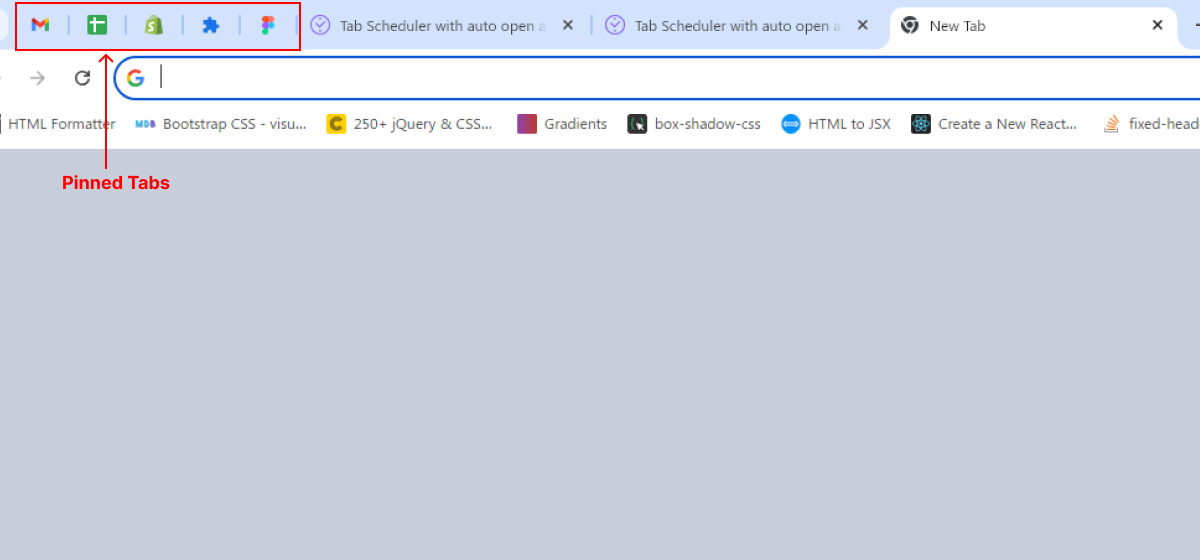
Pinned tabs
Below image is example of pinned tabs
Close only incognito tabs
This feature enables the closing of scheduled tabs exclusively within incognito
mode. However, users need to activate the Allow in Incognito
setting within chrome preferences to utilize this feature.To activate incognito
mode in chrome, follow these simple steps
Open Google Chrome.
Click on the three-dot menu in the top right corner.
Find Extensions.
Select "Manage extensions"
Locate our extension "Tab Scheduler with auto open and close" and click on
"Details.".
Toggle on "Allow in incognito" mode.
Once enabled, your scheduled tabs will be closed only within incognito mode.
Website Link*iexample.com
TitleiPrivate tabs
Select Frequency*iEvery Day⌄
Schedule Type*iClose matching tabs⌄
Close Timei23:00◷
Close Datei▦
Close on dayi-⌄
▾ More options
Open URL In New WindowiOpen URL in BackgroundiOpen in incognito modeiRefresh tab if URL is already openiDo not close pinned tabsiDo not close active tabi1Close only incognito tabsiURL FilteringiJust remind me (don't open the tab)iWarn me 60 seconds before closingiRun on browser start if missed at scheduled timei
Don't notify me when this runsiSchedule enablediAuto Focus TabiCancelSave Schedule
1Close only incognito tabs.
Do not show notification
This feature enable/disables notifications when tabs are opened or closed. By
default, notifications display the Website Link, title, and description provided
in the input
1Don't notify me when this runsiSchedule enablediAuto Focus TabiCancelSave Schedule
1Don't notify me when this runs turns the notification off for this schedule.
Activate this scheduled tab
This feature allows users to active/deactivate current scheduled tabs. Once
deactivated, the tab will no longer open or close according to its schedule
Scheduled Tab ListOpen All Scheduled LinkClose All Scheduled LinkImport/Export⌄
Title
Website Link
Open Time
Close Time
Status
Action
Daily stand-up
https://meet.google.com/abc-defg-hij♪⌖
Open every day on October 21, 2026 at 9:55:00 AMNext run: Oct 22, 09:55 AMLast run: Oct 21, 09:55 AM
-
1On
❐▶⇅✎✖
Read the news
https://news.ycombinator.com♪
Open at a random interval between 20–45 Minute
-
2Off
❐▶⇅✎✖
1A schedule that is on, 2a schedule that is switched off but kept.
Refresh tab if URL is already open
How it Works
Identify the URL: Check if the desired URL is already open in any of the
tabs in your browser.
Refresh the Tab: If the URL is found in an open tab, refresh that tab
instead of opening a new one.
Website Link*igithub.com
TitleiGitHub
Select Frequency*iEvery Day⌄
Schedule Type*iOpen a website⌄
Open Timei09:55◷
Open Datei▦
Open on Dayi-⌄
▾ More options
Open URL In New WindowiOpen URL in BackgroundiOpen in incognito modei1Refresh tab if URL is already openiDo not close pinned tabsiDo not close active tabiClose only incognito tabsiURL FilteringiJust remind me (don't open the tab)iWarn me 60 seconds before closingiRun on browser start if missed at scheduled timei
Don't notify me when this runsiSchedule enablediAuto Focus TabiCancelSave Schedule
1Refresh tab if URL is already open, under More options.